lesson 02
Language Basics
This lesson is a reference. Look at the important sections, but you do not need to memorize everything here before building something. Come back when you encounter a feature you have not seen before.
Bindings
There are three user binding forms:
let— immutable name; cannot be reassignedvar— mutable local valuemesh— visible scene state; creates a leader/follower pair (covered in depth in the Animation lesson)
let radius = 0.45
var count = 0
mesh dot = fill{CYAN} Circle(radius)
Dynamic Typing
Monocurl is dynamically typed. A variable can hold any value and can be reassigned to a different type.
"int"
"hello"
["list", 3]var x = 7
print type_of(x)
x = "hello"
print x
x = [1, 2, 3]
print [type_of(x), len(x)]Use print while authoring to inspect values. Print output appears inline in the editor and in the console (alternate to timeline).
Strings And Escapes
Monocurl strings use % as the escape marker, not \. This is so that LaTeX remains easy to write: backslashes are ordinary string characters.
let newline = "first%nsecond"
let quoted = "say %"hello%""
let percent = "100%%"
Deep Copy
Assignment always performs a deep copy.
[[[1, 2], [3, 4]], [[99, 2], [3, 4]]]var a = [[1, 2], [3, 4]]
var b = a
b[0][0] = 99
print [a, b]Direction Literals
Monocurl has compact vector literals for common directions, which are often used for positioning.
[1.5, 0.8, 0.0]
[-2.0, -1.0, 0.0]
[0.0, 0.0, 3.0]let p = 1.5r + 0.8u # [1.5, 0.8, 0]
let q = 2l + 1d # [-2, -1, 0]
let behind = 3b # [0, 0, 3]
print p
print q
print behindl/r— left / right (negative / positive x)u/d— up / down (positive / negative y)b/f— backward / forward (positive / negative z)
Direction literals are just three-element lists. You can pass them to shift{} or center{}, and use them anywhere a vector is expected.
Lists And Maps
Lists use zero-based indexing. Maps use key -> value pairs.
[[[-1.0, 0.0, 0.0], [0.0, 1.0, 0.0], [1.0, 0.0, 0.0]], [0, 0, 0]]var pts = []
pts .= 1l
pts .= 1u
pts = pts .. 1r # .. appends; .= is shorthand for x = x .. y
let labels = ["origin" -> ORIGIN, "right" -> 1r, "up" -> 1u]
print [pts, labels["origin"]]Block Syntax
block {} is a multi-line expression that accumulates a list. Lines beginning with . append to an implicit return value; the whole block evaluates to that list.
let row = block {
    for (i in range(0, 4)) {
        . center{[i - 1.5, 0, 0]} fill{CYAN} Square(0.4)
    }
    . center{2r} color{ORANGE} Text("end", 0.55)
}
Lambdas And Labeled Arguments
Functions are lambdas, which are treated first class. Arguments can have defaults, and a braced body can use return.
25
11
5.0let square = |x| x * x
let capture = 3
let weighted = |x, weight = 1| x * weight + capture
let hyp = |a, b| {
return sqrt(a * a + b * b)
}
print square(5)
print weighted(4, weight: 2)
print hyp(3, 4)let Ball = |pos, radius, col|
center{pos} fill{alpha{0.2} col} stroke{col, 2} Circle(radius)
mesh ball = Ball(pos: 1.4l, radius: 0.35, col: BLUE)
"move"
# Mutate individual fields; the Ball(...) call is recomputed from them
ball.pos = 1.4r
ball.radius = 0.6
ball.col = ORANGE
play Lerp(1.5)This is not object mutation in the usual sense. ball.pos = 1.4r edits the labeled argument stored inside the live Ball(...) invocation, then the entire call re-runs with the new argument. This is how Lerp knows how to smoothly interpolate between the two states: it interpolates each argument independently and reconstructs the mesh at each frame.
Operators
mesh shape =
    center{pos: 1r}       # positions the result
    fill{alpha{0.18} BLUE} stroke{BLUE, 2}
    Circle(radius: 0.5)      # base constructor

# you can access inner attributes
shape.radius = 1.0
# or attributes of the operators
shape.pos = 1l
Read right to left: Circle(0.5) creates the geometry; stroke, fill, and center transform it in sequence. You can define your own operators with operator in terms of existing ones:
let soft_style = operator |target, col|
    fill{alpha{0.2} col}
    stroke{col, 2}
    target

mesh shapes = [
    center{1.3l} soft_style{BLUE} Circle(0.45),
    center{1.3r} soft_style{ORANGE} Square(0.75)
]
Built-in operators handle styling (fill, stroke, color, alpha), positioning (center, shift, rotate, scale), layout (next_to, to_side), and identity (tag).
Operators also carry animation semantics, which will be discussed later.
Control Flow
Standard control flow: if/else if/else, for, while, break, continue. Use them to build data before turning it into meshes.
[1.35, 1.52]
0
1
2
3
4
{"index" -> 0, "value" -> "a"}
{"index" -> 1, "value" -> 1}
{"index" -> 2, "value" -> 3.14}var above = []
let values = [0.75, 1.35, 0.92, 1.52, 1.05]
for (v in values) {
if (v > 1.1) {
above .= v
}
}
print above
# range(start, stop) or range(start, stop, step)
for (i in range(0, 5)) {
print i
}
# destructuring
for ([i, v] in enumerate(["a", 1, 3.14])) {
print ["index" -> i, "value" -> v]
}Recursive lambdas take themselves as an explicit self argument. This is standard in lambda calculus, but it may look strange if you haven't seen it before.
21let fib = |self, n| {
if (n <= 1) { return n }
return self(self, n - 1) + self(self, n - 2)
}
print fib(fib, 8)Putting It Together
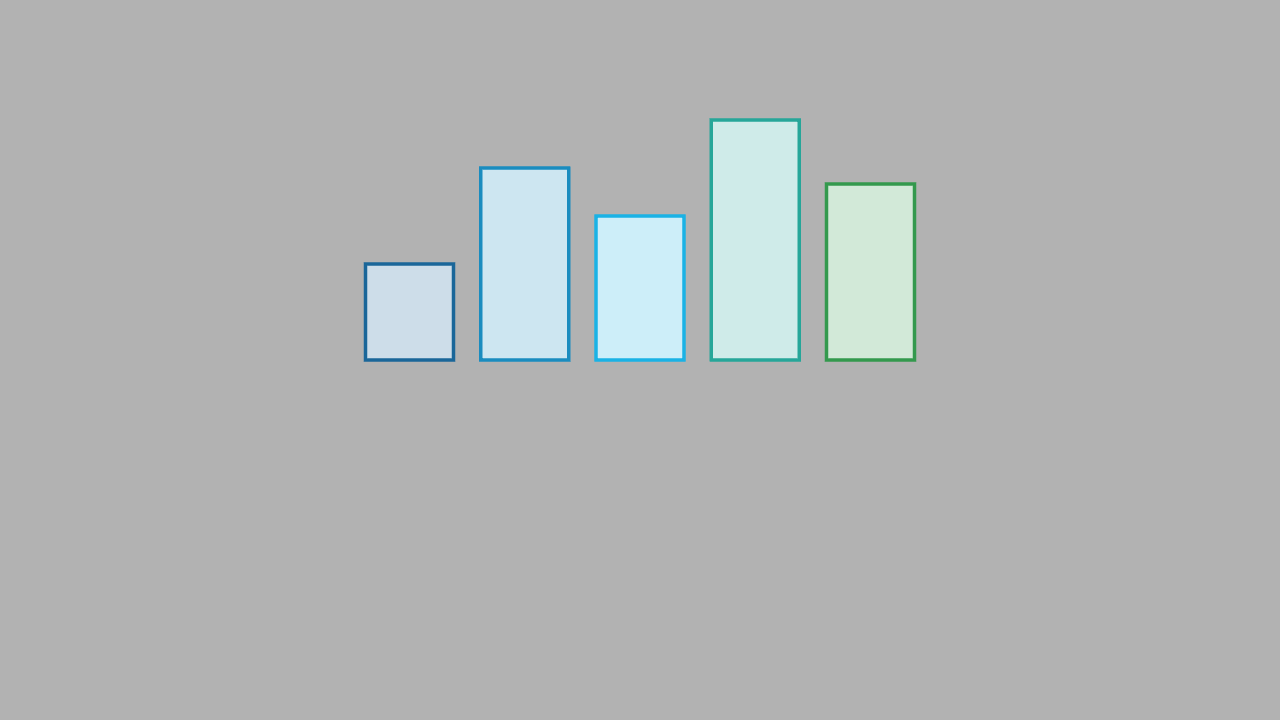
A typical helper function builds a labeled mesh and uses operators for styling. The labeled arguments become animation keyframe fields.
background = LIGHT_GRAY

let Bar = |height, col, x|
    center{[x, height / 2, 0]}
    fill{soft{} col}
    stroke{col, 2}
    Rect([0.55, height])

mesh chart = block {
    let data = [0.6, 1.2, 0.9, 1.5, 1.1]
    for (i in range(0, len(data))) {
        let x = (i - 2) * 0.72
        let col = keyframe_lerp([0 -> BLUE, 0.5 -> CYAN, 1 -> GREEN], i / 4)
        . Bar(height: data[i], col: col, x: x)
    }
}